At Logic Squad, we rely on several popular web applications to provide essential services: Artifactory for Maven artifact management, and Jenkins for continuous integration. Naturally we want to use SSL to communicate securely with these apps. While you can certainly set this up manually in each of those applications, the process is tedious and error-prone. There is a better way: use an Application Load Balancer to provide the SSL termination. Obviously there is an ongoing cost involved, but unless your labour is free, it’s probably exceeded by the cost of maintenance of a manual approach.
Overview
The aim here is simple:
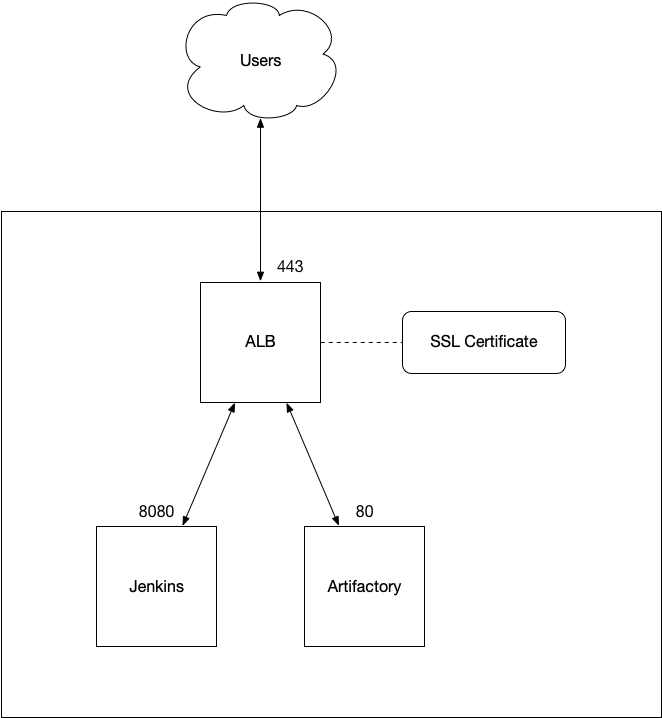
- All requests to Jenkins and Artifactory should be intercepted by the Application Load Balancer (ALB), which is using an SSL certificate to provide SSL termination.
- Based on some attribute of the request, they are forwarded by the ALB to Jenkins or Artifactory running on EC2 instances. This can be done over regular HTTP.
- The Jenkins and Artifactory instances are now otherwise inaccessible to the outside world.
The following diagram summarises this setup.
Pre-requisites
For the purposes of this article, we’re assuming you already have Jenkins, Artifactory, or some other web application running on an EC2 instance. In the diagram above, we show those applications running on their default ports: 8080 for Jenkins, and 80 for Artifactory.
If you already have an SSL certificate, you can upload to it to AWS Certificate Manager. If you don’t have one, AWS will create one for you for free. (Note that you can’t use it outside AWS.) In fact, if you already have one but won’t be using it outside AWS, you might want to let it expire and take advantage of a no-cost AWS-issued certificate.
Setting up
Create an ALB with an HTTPS Listener. Select the certificate you uploaded to or created with Certificate Manager. Create a Target Group for each backing application—it doesn’t matter that you only have a single instance in each Target Group. The Target Group should listen on the port appropriate for the application. (So, in the example above, 8080 for Jenkins and 80 for Artifactory.) We’ll adjust the health checks later.
An ALB can filter on a request’s host part, so you can configure the single Listener to handle both applications by adding two rules:
- If Host is maven.example.com then forward to Artifactory
- If Host is jenkins.example.com then forward to Jenkins
Note that to do this, you’ll need to have a wildcard SSL certificate installed in Certificate Manager. You might want to set your default rule to return a 404. You’ll also need to use Route 53 to add alias A records for those hostnames: they should point at the DNS name for the ALB.
Finishing off
You will probably need to adjust the health check paths for your applications. Hitting the default root path will often result in a re-direct, which the ALB will interpret as failure and hence unhealthy. For example, Artifactory needs a path like /artifactory/webapp/.
You can add an additional Listener on port 80 whose job is just to re-direct the request to SSL. Add a rule for each application that re-directs to the HTTPS URL and returns a 301.
If you haven’t already, you can now lock down the security groups:
- The ALB’s security group should allow open access to ports 80 and 443.
- The application instance security groups can be closed as tight as you need, perhaps only allowing SSH if you need this.

 Notes
Notes 