Detecting a TOC in a Word document with Apache POI

We’re using Apache POI to manipulate the content of some Word documents. There are other ways to do it, but, on the whole, Apache POI works reasonably well for a nominally free solution. We’ve hit a use case that can be summarised by a simple question: does this Word document contain a (Word-generated) table of contents (TOC)? You would think that that is a reasonably uncontroversial question, perhaps even one commonly asked. Apparently it is not.

Background

The background here is that I know nothing about TOC generation in Word beyond what I’ve been able to deduce from examining Word’s behaviour and trawling the content of word/document.xml. I gather that Word inserts a processing instruction of some kind, but also renders static content into the file—that is, there’s a marker saying “there is a TOC in this document”, but the TOC content itself is also rendered. It seems that instead of dynamically generating the TOC content (say, every time the document is changed), Word instead generates it once, and then it is only updated on a manual re-generation. So the problem we’re facing is:

  • A document has a TOC.
  • We make changes to the body content: say, removing an entire section.
  • The TOC is now stale, and instead of automatically refreshing it, Word inserts error messages at print time.

A basically satisfactory workaround in our case is to call enforceUpdateFields() on the document prior to save, which signals to Word to show a dialog on next load:

Again, this isn’t ideal, but it is satisfactory.

Solution

Apache POI doesn’t expose anything useful in its high-level API for detecting an existing TOC. After an exhaustive Google search, and quite a bit of digging around in the lower-level class hierarchies, it wasn’t obvious that we could solve this at any level using Java alone.

Inspecting word/document.xml suggested that a processing instruction that looked something like this was present in all documents containing TOCs:

<w:instrText xml:space="preserve"> TOC \o "1-3" \h \z \u </w:instrText>

How about if we get the XML for the document and search for such an element? If we call getDocument() on the XWPFDocument, we get a CTDocument1 which implements XmlObject and provides a selectPath() method to select nodes via an XPath expression. (If you’re curious, it took a couple of hours of trial and error to be able to come up with the facts in the preceding sentence!) Firstly, add XMLBeans and Saxon to your POM:

<dependency>
  <groupId>org.apache.xmlbeans</groupId>
  <artifactId>xmlbeans</artifactId>
  <version>3.1.0</version>
</dependency>
<dependency>
  <groupId>net.sf.saxon</groupId>
  <artifactId>Saxon-HE</artifactId>
  <version>9.4</version>
</dependency>

(Again, that excerpt represents an hour of fun trying to assemble mutually compatible versions of POI, XMLBeans and Saxon, as well as answering the question “Do we also need xmlbeans-xpath?” Spoiler: we don’t.) Then, with an XWPFDocument called document, find any w:instrText elements, where w is a namespace which we’ll also define, and see if any of them contain a magic string:

String namespace = "declare namespace "
    + "w='http://schemas.openxmlformats.org/wordprocessingml/2006/main';";
String xpath = namespace + " $this//w:instrText";
CTDocument1 ctdoc = document.getDocument();
XmlObject[] objs = ctdoc.selectPath(xpath);
boolean hasToc = false;
for (XmlObject x : objs) {
	String content = ((SimpleValue) x).getStringValue();
	if (content != null &&
            content.trim().startsWith("TOC")) {
		hasToc = true;
		break;
	}
}

So, it’s brute force and depends on a magic string, but it seems to work. Better solutions gladly accepted!

Using an Application Load Balancer for SSL Termination

At Logic Squad, we rely on several popular web applications to provide essential services: Artifactory for Maven artifact management, and Jenkins for continuous integration. Naturally we want to use SSL to communicate securely with these apps. While you can certainly set this up manually in each of those applications, the process is tedious and error-prone. There is a better way: use an Application Load Balancer to provide the SSL termination. Obviously there is an ongoing cost involved, but unless your labour is free, it’s probably exceeded by the cost of maintenance of a manual approach.

Overview

The aim here is simple:

  • All requests to Jenkins and Artifactory should be intercepted by the Application Load Balancer (ALB), which is using an SSL certificate to provide SSL termination.
  • Based on some attribute of the request, they are forwarded by the ALB to Jenkins or Artifactory running on EC2 instances. This can be done over regular HTTP.
  • The Jenkins and Artifactory instances are now otherwise inaccessible to the outside world.

The following diagram summarises this setup.

alb-setup

Pre-requisites

For the purposes of this article, we’re assuming you already have Jenkins, Artifactory, or some other web application running on an EC2 instance. In the diagram above, we show those applications running on their default ports: 8080 for Jenkins, and 80 for Artifactory.

If you already have an SSL certificate, you can upload to it to AWS Certificate Manager. If you don’t have one, AWS will create one for you for free. (Note that you can’t use it outside AWS.) In fact, if you already have one but won’t be using it outside AWS, you might want to let it expire and take advantage of a no-cost AWS-issued certificate.

Setting up

Create an ALB with an HTTPS Listener. Select the certificate you uploaded to or created with Certificate Manager. Create a Target Group for each backing application—it doesn’t matter that you only have a single instance in each Target Group. The Target Group should listen on the port appropriate for the application. (So, in the example above, 8080 for Jenkins and 80 for Artifactory.) We’ll adjust the health checks later.

An ALB can filter on a request’s host part, so you can configure the single Listener to handle both applications by adding two rules:

  • If Host is maven.example.com then forward to Artifactory
  • If Host is jenkins.example.com then forward to Jenkins

Note that to do this, you’ll need to have a wildcard SSL certificate installed in Certificate Manager. You might want to set your default rule to return a 404. You’ll also need to use Route 53 to add alias A records for those hostnames: they should point at the DNS name for the ALB.

Finishing off

You will probably need to adjust the health check paths for your applications. Hitting the default root path will often result in a re-direct, which the ALB will interpret as failure and hence unhealthy. For example, Artifactory needs a path like /artifactory/webapp/.

You can add an additional Listener on port 80 whose job is just to re-direct the request to SSL. Add a rule for each application that re-directs to the HTTPS URL and returns a 301.

If you haven’t already, you can now lock down the security groups:

  • The ALB’s security group should allow open access to ports 80 and 443.
  • The application instance security groups can be closed as tight as you need, perhaps only allowing SSH if you need this.

Delayed job execution with Quartz and Elasticache

In this post I detail a structural change in a web application which involves delayed scheduling of job execution. In the legacy design, each application node maintained its own job queue using standard Java high-level concurrency features. We migrated the application to use Quartz Job Scheduler, which enabled us eventually to offload the persistence of job scheduling details and other metadata to Redis running on Amazon Elasticache. De-coupling job creation, scheduling and execution allowed for more flexibility in taking application nodes out of service, and provides improved resilience for scheduled job metadata in the event of application node failure.

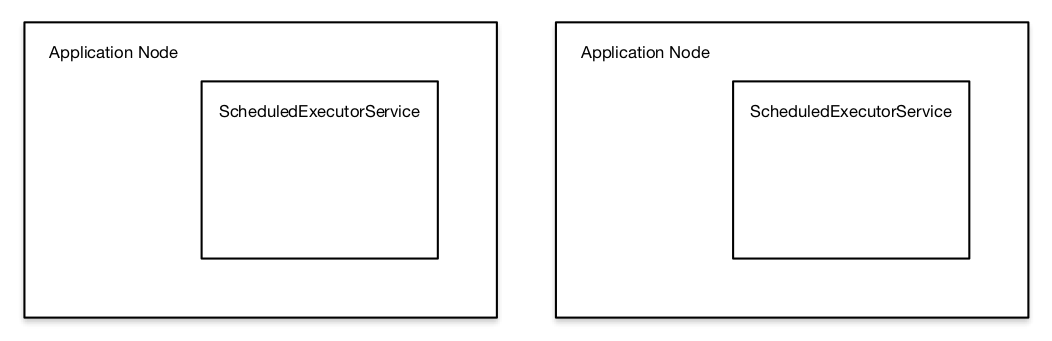
Logic Squad has a web application with a feature that allows a user to create a set of notifications that are sent after a delay. Our initial implementation involved each application node handling its own scheduling using a ScheduledExecutorService, meaning that a delayed task was held in-memory by the node that created it, and later executed by that same node. This worked well for some time, but always imposed an obvious impediment: a node couldn’t be shut down (for example, to upgrade the application) until its queue had drained, and with tasks that could be delayed up to 36 hours, this was a significant downside to that approach.

We wanted to de-couple notification queuing and sending from the main application. Our initial thoughts centred on a stand-alone web service that would handle this—a reasonable idea, but one which would involve a non-trivial amount of work to build from scratch. Meanwhile, in some other contexts, we had started using Quartz Job Scheduler to provide cron-like scheduling of jobs. Of course, Quartz can also provide simpler, one-off delayed scheduling—this was interesting, but didn’t seem to buy us much more than ScheduledExecutorService. It was only when I ran into Quartz’s JDBCJobStore, and the idea of using the database for delayed job persistence that I realised we didn’t need to build a completely stand-alone solution, we just needed to be able to persist the schedule and some metadata about the delayed job.

The original application structure looked like this, with individual application nodes responsible for not only creating, but storing and later executing their own jobs.

Original application structure
The original application structure with respect to handling delayed execution of jobs involved fully self-contained application nodes. Each node was responsible for storing every job it created in-memory, which was both inconvenient and risky.

Not only did this make it difficult to intentionally bring down a node, but an application crash would mean the loss of every delayed job in that node’s queue.

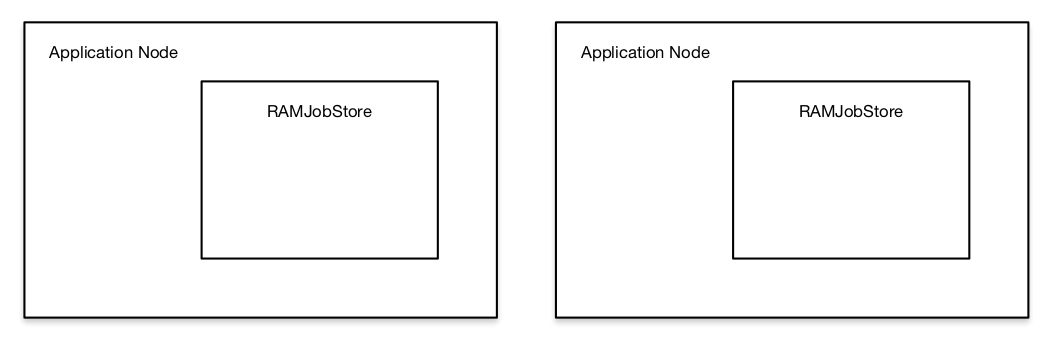
The first step in the transition process was migrating to Quartz and using the RAMJobStore. This bought us nothing compared to our existing system, beyond requiring the migration from Runnables to Quartz Jobs. Instead of submitting a Runnable to the ScheduledExecutorService, we re-wrote some modules to submit a Quartz Job to the Scheduler. At the end of this stage, we had a very similar structure (with essentially the same weaknesses), but dependent on Quartz instead of java.util.concurrent.

Application nodes with RAMJobStores
The first step was to migrate each node to submit Quartz Jobs to a Scheduler, backed by a RAMJobStore. Obviously this suffers from the same problems as the original structure, but was an easy way to test Quartz in this setting.

The initial idea was that the next step would be to migrate to JDBCJobStore, backed by the PostgreSQL. database we were already using (by way of Amazon RDS). Testing in development was very successful. There were a couple of sticking points, though.

  1. Adding additional tables to an otherwise application-focused database.
  2. Setting up those tables automatically on next application launch—we are heavily committed to code-based database migrations, and didn’t want manually-applied SQL scripts lying around.

I started to investigate some Java options for database migration, and just as I was going to begin some proof-of-concept testing, I ran into the idea of using non-database persistence. Options appeared to include:

We went with the forked RedisJobStore, as, frankly, it looked the least like abandonware of all of those projects.

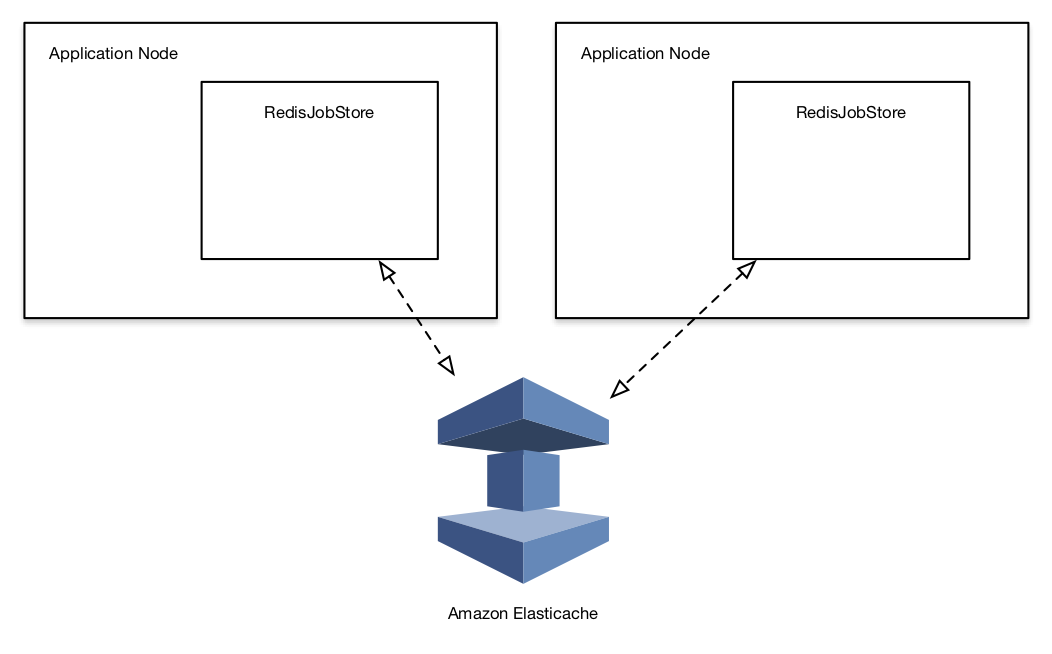
An impressive feature of Quartz at this point was that flipping over from RAMJobStore to RedisJobStore involved only changing a handful of properties—no code changes were required. We were testing on Redis (hosted in a FreeBSD VM on VMWare Fusion) in the morning, and Elasticache in the afternoon.

Final application structure
The final application structure involves using a RedisJobStore to handle jobs on each node, but note that data storage is offloaded to Elasticache. Job metadata persistence is no longer handled by the node creating the job, freeing up the node to be shutdown (or crash) at will. A job can be created by one node and executed by a completely different node later.

We had already migrated a couple of application nodes in production to use Quartz backed by the RAMJobStore. Operation was indistinguishable from the remaining nodes using ScheduledExecutorService—obviously, this was exactly the desired outcome. After a day or so, we migrated a single node to use RedisJobStore backed by Elasticache. Again, there were no issues, and several days later we migrated a second node.

In the first few days, there were two issues. In the QuartzSchedulerThread, we were seeing a few JedisConnectionExceptions arising from:

  • Read timeouts.
  • An apparent failure to get Jedis objects from the JedisPool.

RedisJobStore configuration seems a little undercooked. Some of the parameters are configurable via properties, but others, including socket read timeout and JedisPool size are hard-coded. We worked around this by subclassing RedisJobStore, overriding initialize(), calling super.initialize() and then replacing the JedisPool with a new one.

public void initialize(ClassLoadHelper loadHelper,
                SchedulerSignaler signaler) throws SchedulerConfigException {
        super.initialize(loadHelper, signaler);
        JedisPoolConfig jedisPoolConfig = new JedisPoolConfig();
        // maxTotal defined elsewhere
        jedisPoolConfig.setMaxTotal(maxTotal);
        // timeout defined elsewhere
        JedisPool newPool = new JedisPool(jedisPoolConfig, host, port,
                timeout, password, database, ssl);
        setJedisPool(newPool);
        return;
}

The hard-coded values are 2,000ms for timeout and 8 for maxTotal, so we started by bumping these to 5,000ms and 16. We’re still measuring the effect of these changes.

The new Quartz-Elasticache solution is running on about a third of the total nodes for this application, and has been performing with only the early timeout/resource issues described above for a total of about 20 node-days. We plan to monitor for those and any other issues for at least a few more days, and then migrate the remaining nodes to the new system.